
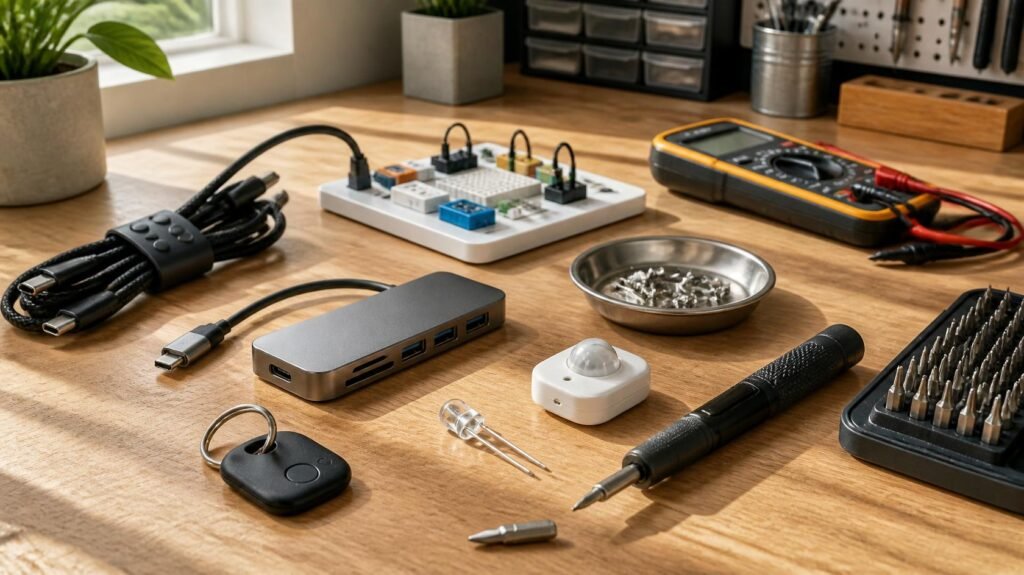
Technology doesn’t always come in the form of expensive smartphones, powerful computers, or complicated machines. Sometimes, the most useful innovations are small components and clever devices that solve everyday problems.
Think about the tiny sensor that switches on a light when someone enters a room, the screwdriver bit that makes furniture assembly easier, or the wireless tracker that helps locate misplaced keys. These are the kinds of practical tools and devices people might casually describe as bits and gizmos.
But what exactly does the phrase mean, and how do these small technological solutions fit into modern life?
Although bits and gizmos is not a formal technical category, it provides a useful way to discuss small components, electronic accessories, inventive gadgets, and practical tools.
This guide explains their meaning, common types, everyday applications, how they work, and what to consider before buying or using them.
What Are Bits and Gizmos?
Bits and gizmos is an informal expression that can describe small parts, handy tools, electronic accessories, and clever devices designed to perform specific tasks or make everyday activities easier.
The two words have slightly different meanings.
A bit can refer to a small piece, attachment, or component. In computing, however, a bit has a precise meaning: it is a binary digit representing either 0 or 1.
A gizmo is an informal name for a device or mechanical invention, particularly one that seems clever, unusual, or useful.
When used together, these words can describe a broad collection of practical inventions and technological accessories rather than one specific type of product.
Understanding the Difference Between Bits and Gizmos
Consider an electric screwdriver.
The interchangeable screwdriver attachment is a bit. The powered screwdriver itself could be described informally as a gizmo because it makes a common manual task easier.
Similarly, a small temperature sensor is a component, while a digital temperature-monitoring device built around that sensor could be called a gizmo.
The distinction is not always strict. What matters is understanding whether you are dealing with an individual component or a complete device.
Why Are They Important?
Small technological solutions often provide benefits without requiring major changes to existing systems.
For example, a motion-activated light can improve convenience in a dark hallway. A USB hub can expand the number of devices connected to a laptop. A magnetic parts tray can prevent screws from disappearing during repairs.
Each solves a specific problem with relatively little effort.
Their usefulness depends less on how advanced they look and more on whether they perform their intended function reliably.
Common Types of Bits and Gizmos
The phrase covers several categories, from simple mechanical attachments to sophisticated electronic devices.
Understanding these categories makes it easier to identify the right tool for a particular situation.
1. Electronic Components and Accessories
Electronic components are the building blocks of many modern devices.
Common examples include:
- Sensors that detect movement, temperature, or light
- LEDs used for lighting and visual indicators
- Switches that control electrical circuits
- USB adapters that connect compatible devices
- Small motors that produce mechanical movement
These components may be used individually in educational projects or combined to create larger electronic systems.
For instance, a basic automatic night light may use a light sensor, electronic circuitry, and an LED. The sensor detects surrounding light conditions, and the circuit activates the LED when the environment becomes sufficiently dark.
Internal linking opportunity: Beginner’s Guide to Electronic Components and Their Functions.
2. Computer and Mobile Accessories
Computer accessories are among the most familiar examples of useful technological gizmos.
A USB-C hub, for example, can provide additional ports for compatible laptops, allowing users to connect external storage, displays, and peripherals.
Other examples include wireless mice, portable card readers, cable organisers, laptop stands, and external storage enclosures.
However, compatibility matters.
Not every USB-C port supports video output, and not every adapter provides the same charging or data-transfer capabilities. Checking specifications before purchasing prevents unnecessary frustration.
3. Smart Home Gizmos
Smart home technology brings sensors, wireless communication, and automated controls into ordinary living spaces.
Examples include smart plugs, motion detectors, wireless door sensors, and programmable lighting systems.
A smart plug can turn an ordinary compatible electrical appliance on or off according to a schedule.
Similarly, a motion sensor may trigger a light when movement is detected.
These products can improve convenience, but they also introduce considerations such as network reliability, software support, and data privacy.
Before installing a smart device, check whether it requires a separate hub, a particular wireless standard, or an internet connection.
4. DIY Tools and Mechanical Attachments
Not every useful gizmo needs electronics.
Mechanical tools and attachments remain valuable in household maintenance, workshops, and creative projects.
Examples include magnetic screwdriver bits, precision clamps, flexible drill extensions, measuring attachments, and compact multipurpose tools.
A flexible drill extension can help reach screws in awkward locations where a conventional drill cannot be positioned comfortably.
The important factor is selecting an attachment that matches the tool, material, and intended workload.
Using an incompatible or poorly manufactured attachment can damage equipment or create an injury risk.
5. Educational and Creative Gadgets
Educational gadgets help learners understand engineering, electronics, and programming through practical activities.
Examples include beginner robotics kits, modular electronic circuits, programmable microcontroller boards, and simple mechanical construction sets.
Some modular learning systems allow users to connect electronic components without soldering.
For example, the littleBits Gizmos & Gadgets Kit was designed around modular electronic building blocks that could be combined into different inventions.
These systems demonstrate how individual components can work together to produce movement, lighting, sensing, and other functions.
For students, the main benefit is the opportunity to experiment with real components rather than learning technical concepts entirely through theory.
How Do Bits and Gizmos Work?
There is no single operating principle behind every gadget. A mechanical attachment works differently from an electronic sensor or wireless tracker.
However, many electronic devices follow a straightforward process: they receive an input, process information, and produce an output.
Input: Detecting Information
An input allows a device to receive information from its surroundings or its user.
Inputs may include buttons, microphones, cameras, temperature sensors, and motion detectors.
Consider a motion-activated hallway light.
Its sensor detects movement within a particular area. That detection provides information to the control circuit.
Processing: Making a Decision
The device then interprets the input according to its design.
In a simple electronic circuit, this might involve switching a transistor or activating a relay.
More advanced products may use a microcontroller running programmed instructions.
For example, a smart lighting system might turn on only when motion is detected and the ambient light level falls below a configured threshold.
Output: Performing an Action
The output is the action produced by the device.
It could involve turning on a light, displaying a measurement, producing a sound, or activating a motor.
In the hallway example, the output is illumination.
The device may then turn off automatically after a predetermined period without detected movement.
This input-processing-output model is useful for understanding many electronic gadgets, although some simple mechanical tools operate entirely through physical forces rather than electronic processing.
Everyday Uses of Bits and Gizmos
Small devices and accessories can improve productivity, convenience, safety, and learning across different environments.
At Home
Practical household gadgets often address repetitive or inconvenient tasks.
A digital kitchen scale measures ingredients more consistently than judging quantities by sight. A rechargeable work light provides portable illumination during repairs. A wireless door sensor can report whether a door has been opened.
The best household gizmos are usually those that solve a problem encountered regularly.
A specialised device used once every few years may offer less value than a simple tool used every week.
In Offices and Workspaces
Workplace accessories can reduce common frustrations.
A docking station can simplify connecting a compatible laptop to external displays and peripherals. A cable management system keeps frequently used connections organised. A compact document scanner can convert paper records into digital files.
For example, an employee who regularly switches between remote and office work may find a compatible docking station more useful than several separate adapters.
However, a docking station should be selected according to the laptop’s supported connections, display requirements, and power needs.
In Education
Hands-on gadgets make abstract technical principles easier to explore.
Students can use sensors to investigate temperature changes, simple circuits to understand electrical connections, and programmable boards to study automation.
A classroom project might involve building a device that measures room temperature and displays the result.
Students learn how a sensor collects data, how software processes measurements, and how an output device presents information.
Such activities also introduce troubleshooting, experimentation, and basic engineering design.
In Workshops and Repairs
Small attachments can make maintenance tasks more manageable.
Precision screwdriver sets help with small fasteners, magnetic trays organise loose hardware, and digital multimeters support electrical measurements.
However, these tools must be used appropriately.
A multimeter, for example, should have suitable safety ratings for the electrical environment being tested. Untrained users should not attempt measurements on hazardous live circuits.
The right tool improves working conditions, but it does not replace technical competence.
How to Choose the Right Bits and Gizmos
With so many gadgets available, it is easy to purchase products that look interesting but offer little practical benefit.
A better approach starts with the problem rather than the product.
Identify the Task First
Before buying anything, ask what you actually need to accomplish.
Do you want to organise cables, connect additional devices, automate lighting, or repair equipment?
Defining the task narrows the options considerably.
For instance, someone who needs more laptop connections should first identify the required ports rather than purchasing the most expensive USB hub.
Check Compatibility and Specifications
Compatibility is particularly important with electronic accessories.
Look at connector types, operating voltage, supported communication standards, device dimensions, and software requirements.
A smart accessory may support one home automation ecosystem but not another.
Likewise, a mechanical attachment may fit a particular tool while being unsuitable for its operating speed or torque.
Always check manufacturer specifications rather than relying on product appearance.
Evaluate Build Quality and Safety
Low prices are attractive, but unreliable components can create additional costs.
Look for clear technical specifications, credible manufacturer information, warranty terms, and relevant safety documentation.
For powered accessories, check electrical ratings and applicable safety requirements. Avoid products with damaged wiring, exposed conductive parts, or questionable power supplies.
For battery-powered devices, follow the manufacturer’s charging and storage guidance.
Consider Long-Term Value
The purchase price is only one part of ownership.
Some gadgets require replacement batteries, paid subscriptions, proprietary accessories, or continuing software support.
A device that seems inexpensive initially may become costly if essential features require ongoing payments.
Compare the total cost with how often the product will be used.
Read Reviews Critically
Customer reviews can reveal recurring problems, but they should not be treated as definitive proof of product quality.
Look for consistent observations about durability, compatibility, reliability, and ease of use.
Independent testing with clearly explained methods is often more informative than promotional descriptions.
Internal linking opportunity: How to Choose Reliable Tech Gadgets and Accessories.
The Benefits and Limitations of Small Tech Gadgets
Bits and gizmos can be useful, but not every technological accessory represents a meaningful improvement.
Understanding both advantages and disadvantages makes purchasing decisions more rational.
Key Benefits
Convenience: Small gadgets can simplify activities that otherwise require repeated manual effort.
Accessibility: Certain devices can make everyday tasks easier for people with limited mobility or other accessibility needs, although suitability varies.
Learning opportunities: Electronic kits and simple machines help beginners explore practical engineering concepts.
Customisation: Interchangeable components allow users to adapt equipment to different tasks.
Potential time savings: A well-chosen accessory may reduce setup time or make an existing process more efficient.
Common Limitations
Some devices create more complexity than they remove.
A smart gadget may stop functioning properly when its network connection fails. A specialised attachment might fit only one product range. A battery-powered accessory may require frequent charging.
Cheap electronic products can also have poor documentation, unreliable performance, or limited security support.
Wireless gadgets that collect personal information introduce privacy considerations.
Before connecting an internet-enabled device, review its permissions, update policy, account requirements, and available security controls.
A useful rule is to avoid buying technology solely because it offers a feature that sounds impressive.
Instead, decide whether that feature addresses a genuine need.
Frequently Asked Questions About Bits and Gizmos
What does bits and gizmos mean?
Bits and gizmos is an informal phrase for small components, tools, accessories, and clever devices. It can refer to anything from mechanical attachments to electronic gadgets, depending on the context. It is not a formally defined technology category.
Are bits and gizmos the same as gadgets?
Not exactly. A bit generally refers to a small part or component, while a gizmo usually refers to a complete device or invention. A gadget is a broader term for a useful device, particularly a compact electronic or mechanical product. The terms can overlap in everyday conversation.
What are some examples of useful gizmos?
Examples include smart plugs, portable USB hubs, digital kitchen scales, motion-activated lights, wireless trackers, and precision repair tools. Their usefulness depends on the task they perform, compatibility with existing equipment, and reliability.
Can beginners use electronic bits and gizmos?
Yes. Many educational kits and basic electronic accessories are designed for beginners. Starting with low-voltage, manufacturer-approved learning kits is generally safer than experimenting with mains electricity. Beginners should follow instructions and avoid modifying powered devices without suitable training.
How can I tell whether a gadget is worth buying?
Start by identifying the problem it solves. Then assess compatibility, build quality, safety, purchase cost, maintenance requirements, and independent reviews. A worthwhile gadget should provide a clear benefit without introducing unnecessary expense or complexity.
Conclusion
Bits and gizmos may sound like an unusual phrase, but it captures something familiar: the small parts, practical tools, and inventive devices that support everyday technology.
From electronic sensors and computer accessories to mechanical attachments and educational kits, these products serve different purposes. Some improve convenience, while others support learning, maintenance, or automation.
Their value does not depend on complexity or appearance. It depends on how effectively they solve a real problem.
Before choosing your next gadget or accessory, identify what you need, check the technical requirements, and compare reliable options.
If you are exploring technology for the first time, begin with a simple project or read a beginner’s guide to electronic components. Understanding how individual parts work together is a practical starting point for discovering what small technological inventions can accomplish.