Creating an AI woman model is easier than ever, but producing a realistic, consistent, and visually appealing result requires more than entering a few words into an image generator. You need a clear concept, a well-written prompt, the right AI tools, and a reliable process for maintaining the same character across multiple images.
Whether you want to create a virtual influencer, develop images for social media, design a digital fashion model, or produce content for a website, AI-generated women can help you turn an idea into a visual character without hiring a traditional photography team.
In this guide, you will learn how to create an AI woman model from scratch, choose suitable tools, write effective prompts, maintain facial consistency, and improve image quality. You will also discover common mistakes to avoid and practical ways to use your virtual model.
What Is an AI Woman Model?
An AI woman model is a computer-generated female character created using artificial intelligence. Depending on the software and techniques used, the character may look photorealistic, stylised, animated, or entirely fictional.
Unlike a traditional model, an AI-generated character does not need to exist as a real person. You can design her appearance, clothing, hairstyle, expressions, poses, and surroundings to match your creative goals.
AI woman models are commonly used for:
- Social media content: Creating attractive visuals for Instagram, TikTok, Pinterest, and other platforms.
- Virtual influencers: Developing fictional personalities with consistent visual identities.
- Fashion and beauty: Displaying clothing, hairstyles, makeup, and accessories.
- Advertising: Producing campaign concepts and promotional images.
- Digital storytelling: Creating characters for blogs, videos, and creative projects.
The main advantage is creative flexibility. However, AI-generated images can contain anatomical errors, inconsistent facial features, and unrealistic details. Good results depend on choosing the right generation method and reviewing every image carefully.
How to Create an AI Woman Model Step by Step
You do not need advanced graphic design skills to begin. A structured workflow makes the process easier and helps you achieve more predictable results.
Step 1: Define Your Model’s Appearance and Purpose
Before opening an AI image generator, decide what kind of character you want to create. A clear concept gives the AI more useful instructions and reduces the need for repeated generations.
Consider the following characteristics:
- Age: Specify an adult character, such as a woman in her mid-20s or early 30s.
- Facial features: Describe her face shape, eye colour, eyebrows, nose, and natural skin texture.
- Hair: Choose a hairstyle, length, colour, and texture.
- Body proportions: Describe a natural or specific fashion-model silhouette where relevant.
- Clothing: Decide whether she will wear casual outfits, business clothing, sportswear, or designer fashion.
- Visual style: Choose photorealistic photography, editorial fashion, cinematic imagery, or digital illustration.
For example, if your goal is to create an AI fashion influencer, you might choose an adult woman with shoulder-length brown hair, natural makeup, realistic skin texture, and a modern wardrobe.
Write these details down before generating images. They will become the foundation of your character and help you maintain a consistent appearance in future content.
Step 2: Choose the Right AI Image Generator
Your choice of tool affects image quality, customisation, editing options, and how easily you can reproduce the same character.
Several tools can help you create an AI woman model, although their features and pricing may change over time.
ChatGPT image generation is useful for creating characters from natural-language descriptions, exploring different appearances, and editing images through conversational instructions.
Midjourney is popular for artistic direction, fashion concepts, and polished visual compositions. Its reference and character-consistency capabilities can help with recurring characters, depending on the workflow and available features.
Stable Diffusion-based tools offer extensive customisation. Depending on the interface, you may be able to use reference images, pose controls, specialised models, and character-training techniques.
Adobe Firefly is worth considering for creative production workflows, image editing, and integration with Adobe applications.
When choosing a tool, consider your priorities rather than selecting one based solely on popularity. Beginners may prefer a simple interface, while creators producing large collections of images may benefit from stronger reference controls and editing options.
Start with one tool and learn its capabilities before paying for several subscriptions. This makes it easier to identify which features actually improve your results.
Step 3: Write a Detailed AI Woman Model Prompt
A prompt is the instruction you provide to an AI image generator. It tells the system what to create and how the final image should look.
Vague prompts often produce generic characters. Detailed prompts provide clearer guidance about appearance, lighting, composition, clothing, and photographic style.
A useful prompt structure is:
Character + facial details + hairstyle + clothing + pose + environment + lighting + camera style + image quality.
For example, instead of writing “beautiful AI woman,” describe the subject, setting, and visual treatment more precisely.
Here is a practical prompt you can adapt:
Example prompt:
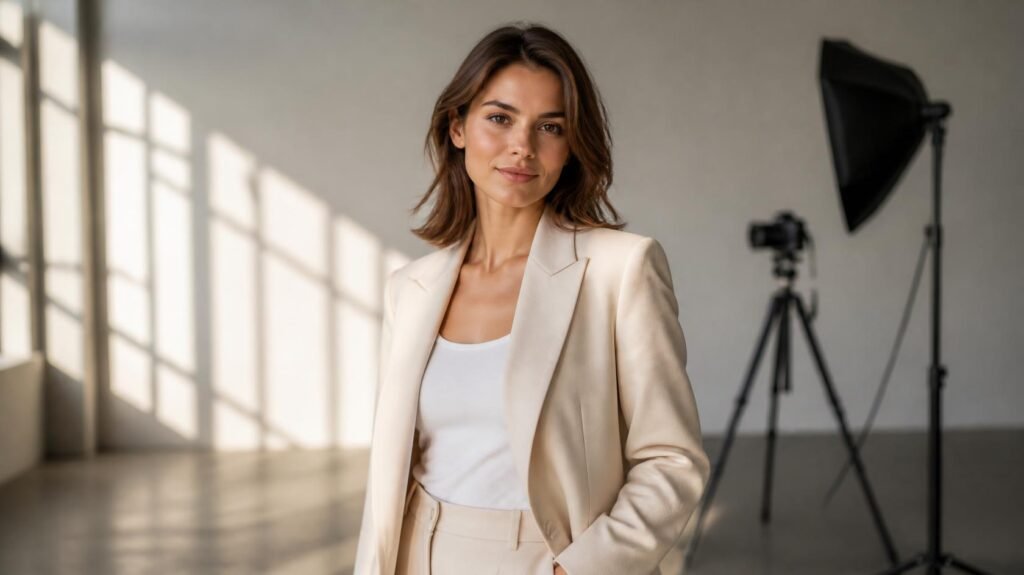
“Create a photorealistic image of a fictional adult woman in her late 20s with shoulder-length chestnut-brown hair, natural facial features, warm brown eyes, and realistic skin texture. She is wearing an elegant cream-coloured blazer with a simple white top. She stands confidently in a contemporary studio with a neutral background. Soft natural window light illuminates her face, creating realistic shadows and balanced skin tones. Professional fashion photography, 85mm portrait lens aesthetic, sharp facial details, natural proportions, subtle makeup, accurate hands, realistic fabric texture, high-resolution finish. No text, watermarks, exaggerated beauty filters, or artificial-looking skin.”
This prompt provides enough information to guide the generation without overwhelming it with contradictory instructions.
Important: Generating a high-resolution image does not automatically make it realistic. Natural lighting, coherent anatomy, believable textures, and balanced facial proportions usually matter more than repeatedly adding phrases such as “8K quality” or “ultra HD.”
Step 4: Generate Images and Refine the Results
Your first generation may not match your expectations. The face might look overly smooth, the hands may be distorted, or the lighting may appear artificial.
Instead of rewriting the entire prompt after every attempt, identify the specific problem and make a targeted change.
For example:
- Plastic-looking skin: Request visible pores, subtle skin variation, and natural highlights.
- Unrealistic eyes: Ask for natural eye proportions, realistic reflections, and balanced facial anatomy.
- Distorted hands: Use a pose with clearly visible hands or keep them outside the main composition.
- Artificial lighting: Request soft, directional daylight with realistic shadows.
- Unnatural clothing: Describe the material, folds, stitching, and how the fabric falls around the body.
- Overly edited appearance: Request minimal retouching and natural facial asymmetry.
Generate several variations if your tool supports them. Compare the results and select the image that best matches your original concept.
For a fashion portrait, inspect the eyes, hairline, fingers, jewellery, garment edges, and background. These details often reveal flaws that are easy to miss when viewing a small thumbnail.
Once you have a strong result, save the original image and record the prompt and relevant settings. This creates a useful starting point for future iterations.
Step 5: Maintain the Same AI Woman Model Across Images
Consistency becomes especially important when creating a virtual influencer, digital brand ambassador, or recurring character.
If you generate every image from a fresh prompt, the face, hairstyle, and body proportions may change. Even small differences can make the character appear to be a different person.
To improve consistency, use a reference-based workflow whenever your image generator supports it.
Start with a master reference image. Choose one clear portrait that establishes the character’s facial features, hairstyle, skin tone, and overall appearance.
Reuse reference images. Upload the master image when creating new poses, outfits, or environments. Adjust the reference strength or character settings if your tool provides them.
Keep a character description. Record stable details such as eye colour, face shape, hairstyle, and distinctive features. Reuse those details in future prompts.
Change only what needs to change. When creating a new image, keep the character description stable while changing the clothing, pose, location, or lighting.
Use specialised workflows when necessary. For larger projects, certain tools support custom character models or fine-tuning methods. These can improve repeatability but may require multiple suitable reference images, technical knowledge, and additional setup.
For example, you could use the same reference character for a studio portrait, a street-fashion photograph, and a professional office scene. The outfits and backgrounds would change, but the character’s defining features would remain recognisable.
No method guarantees perfect consistency in every image. Review each result and correct noticeable differences before publishing.
How to Make an AI Woman Model Look More Realistic
Photorealism depends on the relationship between several visual elements. A convincing face can still look artificial if the skin, lighting, hands, or environment do not match.
Use Natural Skin Texture and Lighting
Real human skin contains pores, fine lines, subtle colour variations, and small imperfections. Excessive smoothing removes these details and creates an artificial appearance.
Describe the skin as natural and realistically textured rather than flawless. Use soft lighting that creates gentle shadows instead of uniform illumination across the entire face.
Lighting should also suit the environment. Window light works well for indoor portraits, while diffused daylight can create convincing outdoor fashion images.
Avoid Overloading the Prompt
Longer prompts are not necessarily better. Too many adjectives, conflicting styles, and repeated quality terms can make the intended result less clear.
Choose a few precise descriptions for the most important visual characteristics. If you want a natural fashion photograph, avoid mixing instructions for cinematic fantasy art, glossy beauty advertising, and documentary photography in the same prompt.
Pay Attention to Camera Composition
Camera perspective affects how realistic a character appears.
A portrait-style composition can emphasise facial details, while a full-body fashion image requires believable proportions and clear clothing structure. If the image generator supports camera and lens descriptions, use them to guide the intended photographic look rather than treating technical terms as a guarantee of quality.
Edit Small Defects Carefully
Image editing can correct minor problems without requiring an entirely new generation. Depending on the tool, you may be able to adjust the face, hands, clothing, background, or individual objects.
Use targeted edits where possible. Recreating an entire image to fix one small defect can introduce new inconsistencies elsewhere.
Before publishing, check the final image at its intended display size. A detail that looks acceptable in a thumbnail may become obvious on a website banner or large screen.
Common Mistakes to Avoid When Creating an AI Woman Model
Several common mistakes reduce image quality and waste generation credits.
Using vague prompts: A description such as “pretty woman, high quality” gives the generator little direction. Define the character, clothing, environment, and lighting more clearly.
Changing too many details at once: If you modify the face, pose, lighting, hairstyle, and clothing simultaneously, it becomes difficult to identify which change improved or damaged the result. Adjust one or two elements at a time.
Expecting perfect consistency without references: Reusing a text description alone may not preserve the same face across multiple generations. Use visual references or specialised character tools when consistency matters.
Ignoring anatomical errors: Distorted fingers, inconsistent jewellery, asymmetrical eyes, and unnatural fabric folds can undermine an otherwise attractive image. Inspect the final output before using it commercially.
Relying entirely on upscaling: Upscaling increases image dimensions and may improve apparent detail, but it cannot reliably repair every structural defect. Correct major problems before increasing resolution.
Ignoring usage rights: Commercial use depends on the tool’s terms, the assets used, and applicable laws. Review the relevant licence and avoid reproducing another person’s likeness, protected branding, or copyrighted designs without appropriate permission.
If you intend to build a public-facing virtual influencer, also make sensible decisions about disclosure. Do not present a fictional AI character as a real person in ways that could mislead audiences, customers, or business partners.
Frequently Asked Questions
How do I create an AI woman model for free?
You can start with an AI image generator that offers a free tier or limited complimentary generations. Define your character, enter a detailed prompt, generate several variations, and refine the strongest result. Check usage limits and commercial licensing before publishing the images.
Which AI tool is best for creating a realistic woman model?
The best tool depends on your requirements. ChatGPT image generation is useful for conversational creation and editing, Midjourney offers strong artistic control, and Stable Diffusion-based tools provide extensive customisation. Compare the available features and test the same prompt before committing to a paid plan.
How can I create the same AI woman in different outfits?
Begin with a master reference image and reuse it when generating new scenes. Keep the character’s defining facial features, hairstyle, and other stable details in your prompt. Change the outfit or environment while keeping the reference settings consistent.
Can I use an AI woman model for commercial purposes?
Potentially, yes. Commercial use depends on the image generator’s licence, the material included in the image, and applicable laws. Review the tool’s current terms, avoid unauthorised use of real people’s likenesses, and check whether any third-party assets create additional restrictions.
How do I make an AI woman model look less artificial?
Focus on realistic skin texture, natural lighting, believable anatomy, consistent facial proportions, and accurate clothing details. Avoid excessive smoothing and exaggerated beauty filters. Correct visible defects before publishing rather than relying solely on upscaling.
Conclusion
Creating an AI woman model involves more than generating an attractive face. The strongest results come from a clear character concept, a suitable image generator, detailed prompts, careful refinement, and a consistent reference workflow.
Start with one fictional adult character and create a high-quality master image. Then experiment with different outfits, poses, and environments while preserving the features that define her identity. Review every result for anatomical errors, artificial textures, and licensing concerns before using it publicly or commercially.
Once you have established a reliable workflow, you can expand your character into a virtual influencer, a fashion-content series, or a digital brand identity. Your next step is simple: choose an image generator, write your first detailed prompt, and refine the result until it meets your intended standard.